Most comparisons of Make and n8n line up feature lists: how many integrations, which has AI nodes, whose canvas looks nicer. For a solo builder the decision comes down to two numbers, how many steps your workflow has and how often it runs.
Make charges for every action a workflow takes. n8n charges once per run, whatever happens inside it. That single difference flips which tool is cheaper as your workflows grow, and it’s why the same automation can cost nothing on one platform and need a paid plan on the other.
This guide works through the math, prices out three workflows a solo site owner would actually run, and covers the part comparison posts usually skip: what it takes to keep a self-hosted n8n alive.
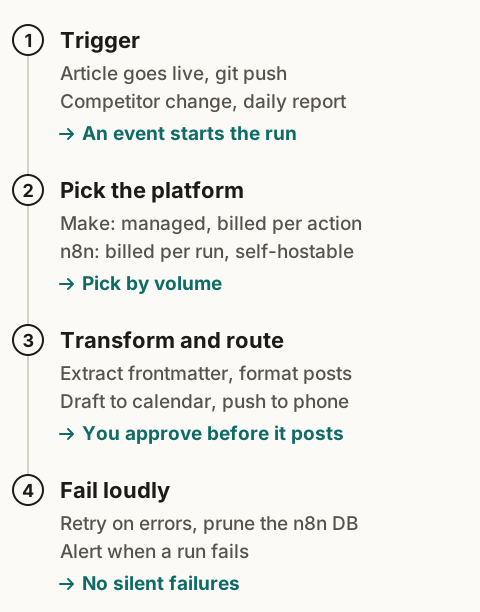
The short answer
- Start on Make. The workflows a solo site really needs are small, and many fit in Make’s free 1,000 credits a month.
- Move to n8n Cloud when you have long workflows (ten-plus steps) running many times a day. Per-run pricing gets cheaper than per-action pricing past that point.
- Self-host n8n when a workflow has to run a program on your own server (a video render, a headless browser), or when volume makes any per-unit pricing painful. Only if you’re comfortable maintaining a Linux server.
How each one charges you
Prices from the vendors’ own pricing pages and docs, checked November 9, 2026. Both change often, so check before you buy.
Make bills in credits. Each time a module does something (reads a record, writes a row, posts a message), it uses a credit. Most actions cost one. Routers and error-handler modules cost nothing.
| Make plan | Price (billed annually) | What you get |
|---|---|---|
| Free | $0 | 1,000 credits a month, runs at most every 15 minutes |
| Core | $9/month for 10,000 credits | Unlimited active scenarios, scheduling down to the minute, Make API |
| Pro | $16/month for 10,000 credits | Core, plus priority execution, custom variables, full-text log search |
Make’s pricing page lists annual billing as 15% cheaper than monthly. Run out of credits and your scenarios stop until you add more; incoming webhooks wait in a queue that holds 667 items per 10,000 credits on your plan.
n8n bills in executions. In n8n’s words, an execution is “a single run of your entire workflow”, and “it doesn’t matter how many steps are in the workflow or how much data it processes.”
| n8n option | Price | What you get |
|---|---|---|
| Cloud Starter | €20/month, billed annually | 2,500 executions a month, unlimited workflows, 5 concurrent runs |
| Cloud Pro | €50/month, billed annually | 10,000 executions a month |
| Community edition | Free software, you pay for the server | Self-hosted, no execution cap from n8n |
The self-hosted Community edition leaves out a few paid features: shared credentials, projects, environments, Git version control, external secrets, and SSO. A one-person business rarely misses them.
The hidden multiplier in Make: loops
Credits scale with the number of items a run processes, as well as the number of runs. When a Make scenario pulls in a list (say, 50 rows from a sheet) and processes each row through three modules, that’s 150 credits for one run. Iterating and aggregating count as actions too.
So the honest formula for Make is:
credits per month ≈ runs per month × (steps that run once + items × steps that run per item)
And for n8n it’s just runs per month. Keep that in mind for every example below.
Worked example: the same workflow on both
Every 15 minutes, check an RSS feed, filter new items, format a message, and post it to Slack. Five actions per run.
- Runs per month: 4 per hour × 24 × 30 = 2,880
- Make: 2,880 × 5 ≈ 14,400 credits, past Core’s 10,000. You’d buy extra credits or a bigger credit tier.
- n8n Cloud: 2,880 executions, just past Starter’s 2,500. You’d need Pro, or a slower schedule.
- Self-hosted n8n: 2,880 runs, no cap. You pay for the server only.
Slow it to once an hour and the picture flips: 720 runs × 5 = 3,600 credits, comfortably inside Make Core, and Make is the cheaper choice by a wide margin.
Three workflows a solo site actually needs, priced out
These are the automations we’d set up first on a content site. The credit counts are estimates from Make’s rule of one credit per action; your exact modules will vary.
1. New article → social drafts for approval
Trigger: your publish webhook. Steps: parse title, summary, and URL; write one draft per channel; add the drafts to a Notion or Sheets table; ping your phone.
- About 5 actions per run, a few runs a week.
- Make: under 100 credits a month. Free plan.
- Use a webhook trigger, not a feed poll. A polling trigger can use a credit on every check even when nothing is new, and checking every 15 minutes would burn the 1,000 free credits by itself.
2. Weekly pricing-page watch
Trigger: once a week. Steps: fetch ten vendor pricing pages, compare each against the copy you stored last week, and message yourself about any that changed.
- Roughly 3 actions per page (fetch, compare, store) plus a couple of fixed steps: about 30 to 35 credits a run, around 150 a month.
- Make: Free plan.
- Why it’s worth it: a price change on a tool you recommend means an article is now wrong. This catches it before a reader does, and gives you a news angle for a quick update post.
3. Monthly affiliate link health check
Trigger: once a month. Steps: read your list of outbound and affiliate links, request each one, and flag any that return an error or redirect somewhere unexpected.
- With 50 links at 2 actions each, about 100 to 110 credits a run.
- Make: Free plan.
- Why it’s worth it: programs close, merchants change URLs, and a dead affiliate link earns nothing while looking fine to you.
All three together stay under Make’s free allowance, because the automations a solo site really needs are mostly small. The case for n8n comes from a different kind of workflow.
When n8n wins clearly
Long pipelines that run often. A workflow with 15 steps running 20 times a day is 9,000 Make credits a month for one scenario. On n8n, it’s 600 executions.
Workflows that need your own server. n8n’s Execute Command node runs shell commands on the machine n8n lives on. That’s how you render a video with Remotion, run a headless browser for screenshots, or call a local script. It’s available only on self-hosted n8n (not n8n Cloud), and since n8n 2.0 it’s disabled by default because it’s a security risk on shared instances, so you enable it deliberately. Make has no equivalent: it runs in Make’s cloud, so it can only call your programs if you expose them as a web API. Our short-form video pipeline is exactly this kind of workflow.
Data you want to keep on your own infrastructure. Self-hosting keeps workflow data on a server you control.
One licensing note: the Community edition is under n8n’s Sustainable Use License, which allows use “for your own internal business purposes or for non-commercial or personal use.” Running your own business on it is fine. Reselling n8n itself as a hosted service to clients is not.
What self-hosting n8n really costs
The license is free. The server isn’t. A Basic DigitalOcean Droplet with 1 GiB of RAM is $6/month and 2 GiB is $12/month (pricing page, November 9, 2026). If you run a database next to n8n, or render video on the same box, size up.
The larger cost is your time. On your own server, these are your jobs:
- Updates and security patches for the operating system, Docker, and n8n.
- HTTPS and a stable domain for webhooks. If the server reboots or the certificate lapses, incoming webhooks fail and nothing tells you.
- Backups of workflows and credentials. Test a restore once, so you know it works.
- Disk space. n8n prunes execution history by default, keeping 14 days or 10,000 executions, whichever comes first. Turn pruning off to keep longer history and you take on watching the disk.
- Monitoring. Point a free uptime checker at the instance.
If you live in a terminal, that’s a small monthly chore. If you don’t, it’s the kind of chore that quietly eats the time you meant to spend on content.
Failures: set this up on day one, whichever tool you pick
An automation that fails silently is worse than none, because you stop checking the thing it was supposed to handle.
- In Make, add an error handler to any module that calls an outside service. Make has five handler types (Ignore, Resume, Commit, Rollback, Break) and none of them cost credits. Break can store the failed run as an incomplete execution so it can be finished later instead of disappearing.
- In n8n, create one error workflow that starts with the Error Trigger node and messages you. Set it as the error workflow for every production workflow. It receives the workflow name, the failing node, and the error message. Use the Stop and Error node when you want a run to fail on a condition you define, like an empty result.
A third option: have an AI write the script
You don’t have to use a visual tool at all. A coding agent like Claude Code or Codex can write a small script for a scheduled job (check ten pricing pages, test fifty links, post a weekly summary), and free infrastructure can run it on a timer: a scheduled GitHub Actions workflow, or a Cloudflare Worker with a Cron Trigger. For a handful of simple jobs, that route can cost nothing and has no credit meter.
The trade is who keeps it running. When an API changes or a page layout moves, a visual tool shows you the broken step; with a script, you (or your coding agent) read the error and fix the code. Secrets, alerts, and logs are also yours to set up. Do you still need Make or n8n if AI can write the script? works through all three routes with a full example.
Which one should you start with?
| Your situation | Start with |
|---|---|
| First automation, no server, a handful of workflows | Make Free |
| Several small workflows, some running hourly | Make Core |
| Long workflows running many times a day, no wish to run a server | n8n Cloud |
| You need to run local programs, or volume is high, and you’re fine maintaining Linux | Self-hosted n8n |
| A few simple scheduled jobs, and you’re comfortable reading code an AI wrote | An AI-written script on a free scheduler |
| Unsure | Make Free. Count your runs × steps for a month, then decide with real numbers |
Quick answers
Is n8n free? The self-hosted Community edition is free to use for your own business. You pay for the server. n8n Cloud is a paid subscription.
What is a Make credit? In most cases, one action by one module. A run uses anywhere from two credits to thousands, depending on how many modules run and how many items they process.
Can I move workflows from Make to n8n later? Not directly. Both export workflows as JSON, but in different formats, so you rebuild them. Pick the tool that fits where your volume will be in six months.
What about Zapier? It’s the other big name. Zapier has no affiliate program for publishers, so we earn nothing either way; it deserves its own comparison rather than a footnote here.
New to automation? Start at the Automation Workflows pillar. Still choosing what to build? Read how to validate a micro-niche before you commit. Need the site first? See the $0-hosting static stack behind LeverSolo.